PDC 2010 Live Streaming is going on at Microsoft Campus, Hyderabad . This biggest broadcasting on PDC happening first time at Hyderabad Campus, Building 3. Here we have many MS Guys along with different community guys and MVP’s. We are all enjoying PDC !!
Sharing few snaps from the here, those are taken before live streaming started !
Will update more on this . At present Scottgu on the big screen with Win Phone 7 !!
Microsoft will be streaming PDC 2010 Session at Microsoft Campus Hyderabad, Tonight. This biggest broadcasting on PDC happening first time at Hyderabad Campus, Building 3. If you have already registered for the event, be there in person by evening 6 PM . Along with the live streaming, we will have networking with senior leadership team, foods and many surprises for the attendees.
If you are tweeting anything on PDC 2010 please use #pdc10 hashtag.
Watch windows is one of most commonly used debugging tool with Visual Studio. We generally used to explore the objects, values, properties and other nested objects as a tree structure. Most of the time we used watch window to only view the values or change the current object properties values to see the effects of changed object during debugging. But we can use watch windows for many different purposes. In this blog post I am going to show 10 Tips, that may help you while dealing with Watch Window.
In Mastering in Visual Studio 2010 Debugging article I have discussed about the basic of Object ID creation while debugging. I received some request from some readers to explain the use of “Make Object ID” in details. In this blog post I am going explain how we can track an Object which is already out of scope using by creating a Object ID while debugging.
By using “Make Object ID” option we are informing Visual Studio Debugger to keep track of that object no matter it’s within scope or out of scope for the current context. We can create “Object ID” either from Locals, Autos or from Watch Windows. Object ID is a integer number followed by a pound (#) sign. When we create Object ID for an particular object, Visual Studio Debugger ( CLR Debugging Services ) use an integer value to uniquely identify the object. This “Object ID” allows you to get the object details even if it is out of scope.
SharePoint 2010 supports fully integration with Silverlight application either of Silverlight In Browser or as a Silverlight OOB ( Out Of Browser) aplications. In this blog post I am going to explain about High Touch Integration with Silverlight and Sharepoint using SharePoint 2010 Client Object Model (OM) with one example of Silverlight Task Lists for Sharepoint. I have also explained how to host a Silverlight web parts with in SharePoint using Sharepoint Out-Of-the-Box Silverlight Web Parts. As per my understanding below is the over all diagram for a High Touch Integration of Silverlight and SharePoint 2010
From the above diagram we can see, that we have SharePoint Client Object Model (OM) and Services, Which can be consumed by a Silverlight Application. Object model and services is not only for Silverlight, you can use them for different client applications.
While running your ASP.net application you might have found it to be running on Integrated Web development environment. Visual Studio 2010 comes with two version of Integrated Web Development environment which could run side by side. In case you run your ASP.NET application in VS 2010 you can have an option to choose between the two version of Web Development environment, one running CLR 2.0, which was there before VS2010 and a new version of Web Dev with CLR 4.0. Multi – targeting allows you to configure your visual studio to run more than one Web Dev server at a time one using CLR 2.0 and another using CLR 4.0
In one of my ASP.NET Online session I had talked about the multi targeting features of Visual Studio 2010 for web development. During the demo I have shown, how we can target two different version of .NET CLR version same time. Some of the attendees having some doubts on that, So in this blog post, I am going to explain how we can target two different version of CLR at same time.
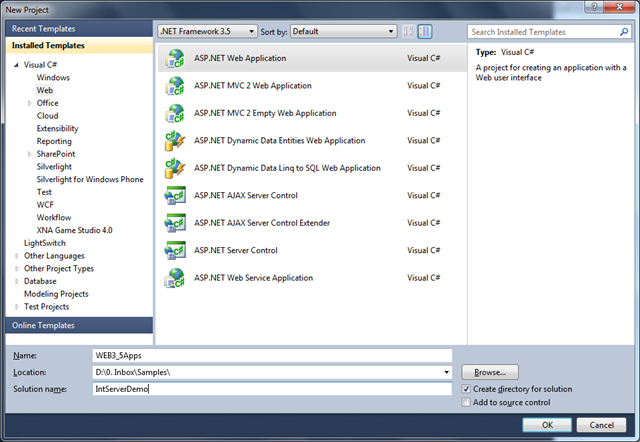
To demonstrate it, Start with a new Visual Studio Instance, and Create a solution file which contains two different Framework version of web applications. Let’s say there are two web application which are targeting to ASP.NET 3.5 and ASP.NET 4.0 version.
One important announcement, I would like to congratulate my friend, a key community contributor on Silverlight, kunal chowdhury for becoming a Microsoft MVP – Silverlight . Please visit his blog at http://www.kunal-chowdhury.com and follow him at twitter @kunal2383 .
I have been asked this question many times by different readers of my blog. They wanted to know about the fundamentals of Web Farms and Web Garden. In this blog post, I am going to explain the what is the exact difference between web farm and web garden, what are the advantages and disadvantages of using them. I have also described how to create web garden in the different version of IIS.
Overview :
Visual Studio is having its integrated ASP.NET engine which is used to run the ASP.NET Web application from Visual Studio. ASP.NET Development Server is responsible for executing all the request and response from the client. Now after the end of development, when you want to host the site on some server to allow other peoples to access, the concept of web servers comes in between. A web server is responsible for responding to all the requests that are coming from clients. Below diagram showing the typical deployment structure of an ASP.NET Web application with a single IIS.
Clients request for resources and IIS Process the request and send back to clients. If you want to know more details on How IIS Process the request, please read one of my article over “How IIS Process ASP.NET Request ?”.
Web Farm :
This is the case, where you have only one web server and multiple clients requesting for the resources from the same server. But when there are huge numbers of incoming traffic for your web sites, one standalone server is not sufficient to process the request. You may need to use multiple servers to host the application and divide the traffic among them. This is called “Web Farm.” So when you are hosting your single web site on multiple web server over load balancer called “Web Farm.” Below diagram showing the over all representation of Web Farms.






 Abhijit's Blog
