
Understanding the ASP.NET Page Life Cycle is an essential knowledge for developing ASP.NET Web Application. When request come from client to server there are many operations performed in backend before sending response to the client. When client request for some information from a web server, request first reaches to HTTP.SYS, which is the kernel level of IIS. HTTP.SYS then send the request to respective Application Pool. Application Pool then forward the request to worker process to load the ISAPI Extension which will create an HTTPRuntime Object to Process the request via HTTPModule and HTTPHanlder. Once request passed through the HTPP Pipeline, ASP.NET Page Life Cycle Start. You will find several articles that describes the What is ASP.NET Page lifecycle, what are the different events fired during page lifecycle. This post is something different, I will show you how you can see the each and individual Page life cycle events using IntelliTrace
If you wondering what is IntelliTrace, Well, IntelliTrace debugging is only available with Visual Studio 2010 Ultimate edition, which collects debugging information in background and can be used at any point to time to analysis previous debugging data. IntelliTrace collected debugger information into a trace log file (.iTrace ) that can then be opened and debugged using Visual Studio later. You can use the log file at any point of time to see what happened exactly at background during your live debugging. To know more details, you can see my several articles published on IntelliTrace and for step by step guide read “Debugging Application using IntelliTrace” from MSDN .
As we are going to use IntelliTrace, first do the initial setup for IntelliTrace from Tools > Option > IntelliTrace. We have to select the second option “IntelliTrace events and call information” as this setting will collects all the event as well as internal call information.

As of now, that is all about IntelliTrace setting, Let’s have a quick look into ASP.NET Page Life Cycle startup, Any request comes from clients, first hits the kernel level HTTP.SYS of IIS. HTTP.SYS and WAS Interacts each others and pass the request to proper Application Pool. Then Worker Process takes care of each and individual request. If you are interested, please read one of my article,Beginner’s Guide: How IIS Process ASP.NET Request which talks about internal of ASP.NET Request Processing. Once the request done with HTTP Pipeline Processing, request enters into Page Lifecycle state. Below pictures illustrate the same.
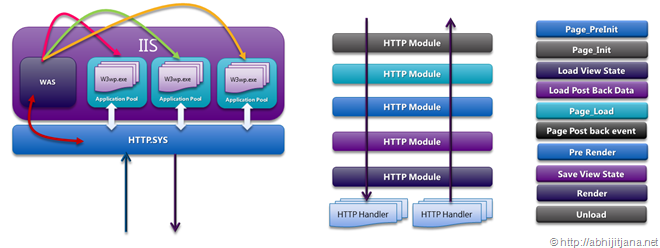
It is bit difficult to remember exactly what happens and when during the ASP.NET page lifecycle. But if you really look into general stages of ASP.NET Page lifecycle, we can majorly classified below stages
- Page Request
- Start
- Page Initialization
- Load
- Validation
- Postback event handling
- Rendering
- Unload
To know more about each and individual stages, please read this article from MSDN .
Now let me start with a simple web application that consist of a Master Pages, User Control and Main page having some data in grid. I am putting master pages, user controls, grid view together to show how they really works internally. Both the Grid and User controls reads some data from Data Base.

If I run the web application, I will get the below out put.

Now, get back to Visual Studio and Break the IntelliTrace Event from IntelliTrace Window ( Debug > Window > IntelliTrace Call Window )

Once you click on “Break All” , you will get so many events including thread, file access ( Which depends on IntelliTrace Settings ). But to make it very simple, filter the information based on the ASP.NET as shown in below picture

Let’s have a in-depth look what are the information it captured. If you click on the first event, which is actually an Asynchronous call the the HTTP Handler initialized and first GET request the ASPX Page.

Click on the “Call View” for more details, below information will appear which talks about many internal stuff of ASP.NET.
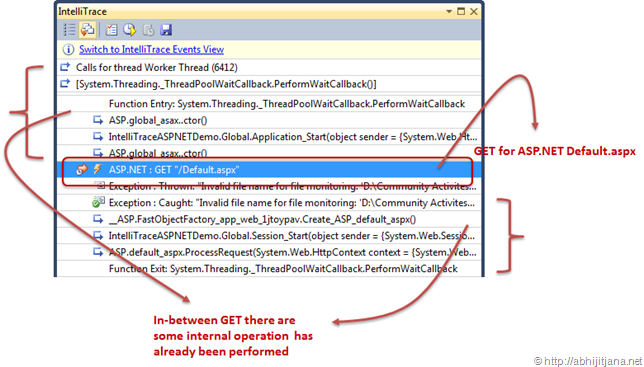
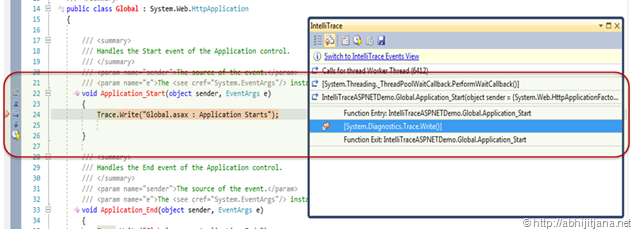
Let’s start with Application_Start() Event is fired when the first instance of the HttpApplication class is created. It allows you to create objects that are accessible by all HttpApplication instances during the Application Life Cycle. If you click on the particular row in the IntelliTrace window, you will be automatically redirect to to code as well.
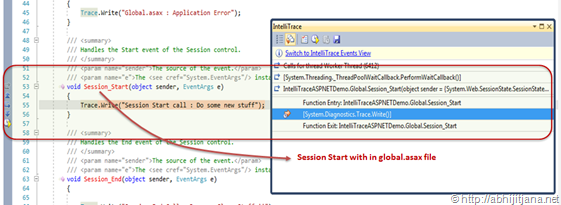
On finishing of the Application_Start(), the next event fire is “Session_Start”. IntelliTrace will also capture the information for Session.
Once the request passed through Session_Start(), it’s entered into actual Page Life Cycle state is which the Process Request for a particular page. If you look at the below picture, it’s talks about everything of a page life cycle. IntelliTrace Captured all in-between events of Page_Process Request Start to Page_Process Request End. Note, we send the the request for Defualt.aspx ( Get / Default.aspx) , hence ASP.NET Engine will start the processing for Default.aspx. As this Page has a user control and contain with in a Master page you can see there are several events fired with in process request that are related with master pages and user controls. 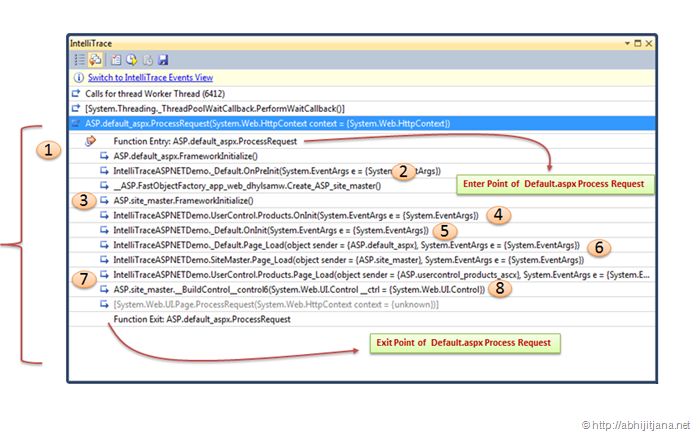
Image : Page Process Request
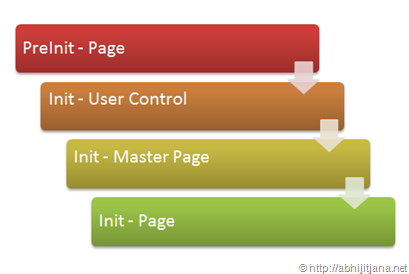
Before explaining about the above images, here is some golden rule that ASP.NET follows during page life cycle events. PreInit() of request pages fired first and followed by init event of User Control, Master Pages and then finally init event for the requested page. This is the sequence how ASP.NET fired up events. Below image illustrate the same.
Now, coming back to Page Process Request image, I have marked the images with few numbers to under stand the sequence of execution.
With the start of ASP.NET Page Process Request, ASP.NET runtime engine called a method ASP.<Pagename> _aspx.FrameworkInitialize() , or Page.FrameworkInitialize() method to initializes the Page object and creates the control tree based on the declarative nature of the page. One more thumb rule here is, you should not override this methods, if you are doing so don’t forget to call base class’s FrameworkInitialize method.
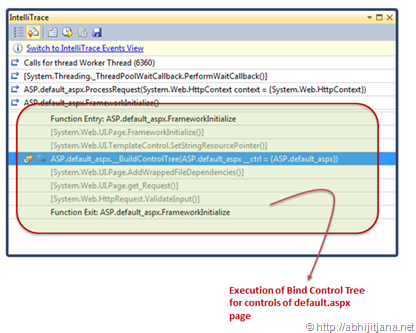
If you again deep dive with with in Bind Control Tree, you can see the each and every control binding. During this phase asp.net did some top level binding for aspx pages, like page title set, setting up the master pages and also Add the Content Templates for Content Place holder. Note, if you don’t have the master page, you won’t be able to see this events during page life cycle. I took example with master page so that I can cover all the stuff.

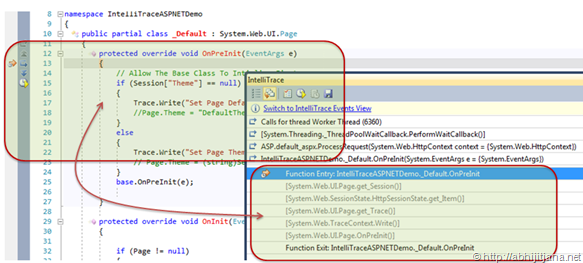
Once done with the FrameworkInitialize(), Request moves to Page OnPreInit() events. If you use the IntelliTrace navigator, you can go to inside of event recorded by IntelliTrace also can see the corresponding code. You can read Page.PreInit() for more details.
Once done with PreInit(), request moves to FrameworkInitilization() of Master Page. During this phase, ASP.NET creates control tree for the master pages.
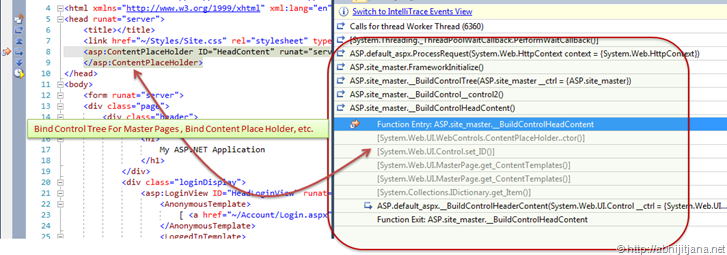
during this phase you can also find , how each and every controls adding to control tree.
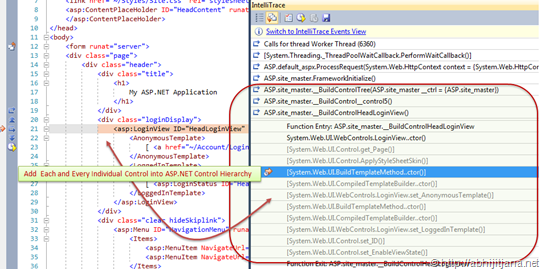
Once ASP.NET done with FrameworkInitialize of Master pages, ASP.NET engine fires Init() event for User Control . This events raised after all controls have been initialized . Read more about Init()
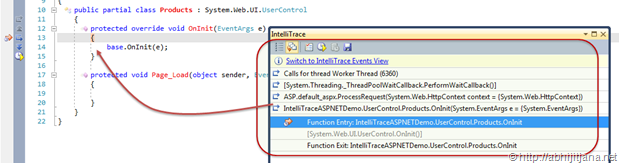
The next event it will fire is, init of Master page, if you are not overriding it the event will move to Init() event of Default.aspx page.

Once done with Page_Init(), ASP.NET fires Page_Load() event for default.aspx page. followed by Page_Load of Mater Page and then User Control . Below is the sequence diagram for Page_Load() for page, master page and User control, yes it’s revers the over of Init() method.
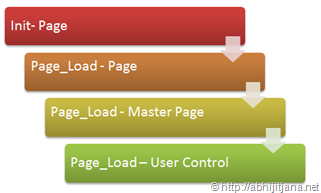
IntelliTrace Traps the Same, Using IntelliTrace we can see, first Page_Load() of default.aspx fires, followed by Page_Load() of master page, then Page_Load() of User control.
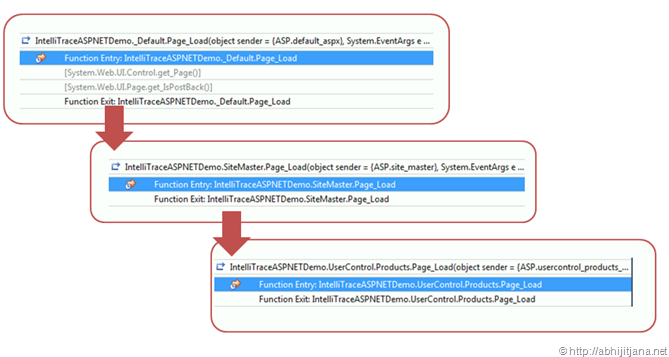
In the next phase, before Saving the Data on View State it will load all the data from backend . You can see the corresponding ADO.NET events, that fires for load data from from backend saver.

Once that is done, SaveViewState() methods is been called to store the data with in View State. “Save State Completed” raised after view state and control state have been saved for the page and for all controls.

once the View data been saved, ASP.NET calls Render method that that writes out the control’s markup to send to the browser

You can also override other methods of page lifecycle to get more details view. On Page Post back, you can explore the different events for post back as well, like if you clicked on some button, IntelliTrace will show you how post back has been initialized also you can view the sequence of ASP.NET Page life while post back.
To summarize the whole stuff, I have discussed how you can use the power of IntelliTrace to visualize the each and every events which are related with ASP.NET Page life cycle. Most of us knows about the basic events of Page Life Cycle, but using IntelliTrace you must have see something new stuff and also seen what are the internal methods been called during page lifecycle.
That’s all guys ! Hope you have enjoyed the reading ! Let me know if you have any query regarding this !
Cheers !
Aj
http://twitter.com/#!/AbhijitJana/status/84929421777190912

 Abhijit's Blog
Nice one Abhijit…you are doing a fantastic job on the ASP.NET front. keep them comin….
LikeLike
Thanks very much !!
LikeLike
Great going Abhijit.
Really nice article.
LikeLike
Great explanation dude!!
LikeLike
cool one very nice oresentation…….
LikeLike
what an explanation and presentation….no one will beat u in presenting the articles..gud work sir..
keep it up..
LikeLike
Thanks very much
LikeLike
Awesome post! very lucidly written 🙂
LikeLike
This is severely cool.. keep it up Abhijit.
LikeLike
Is there any way to use these events (except Page_Load of course) inside application?
At least for debug purposes.
I like Page_Unload the most.
LikeLike
nice article.., is there an other way to use IntelliTrace; i mean for those of us that don’t have Visual Studio 2010 Ultimate edition?
LikeLike
No. IntelliTrace is only available with VS 2010 Ultimate Edition
LikeLike
Awesome post… remind me basics of .Net
LikeLike
Nice post, and great explention
LikeLike
Working Great Abhijit.
You always try your best to show the internals of ASP.NET and IIS. I wait of your post on codeproject. You know the way to convey the message to other with simple manner.
Thanks.
LikeLike
Nice thought and knowledge sharing
LikeLike
Great article .. easy to ready and understand. Keep up the great work.
LikeLike
Can you tell me What is the name of this drawing software and Where can I get it?
it’s awesome.
LikeLike
ha,I found it by myself,It’s PowerPoint.
LikeLike
Nice post man………..you always rocks
LikeLike
This is practical explanation , so it is very useful to people
thanks ………..
LikeLike
Great article..this rocks..
LikeLike
very useful, thanks.
LikeLike
Very good Explanation abhijit
LikeLike
nice article ,thankew
LikeLike
very good article
LikeLike
Great article sir!!! I have been following your blog for last 2 months…it has helped me a lot to gain additional knowledge on Asp.net !! Keep up the good work!! God Bless u ! 🙂
LikeLike
Very nice article
LikeLike
Excellent Article. It helped improve my understanding
LikeLike
Excellent job …Please keet it on……
LikeLike
I want to know abut click_event.wen it will invoked .I read ur article its absoutly fantastic…
how Events working in life cycle….suppose we are using diffferent events for differnt controls .
LikeLike
Superb Article abhi….
LikeLike
Great Article with Visual Proof in time. really nice one.
LikeLike
I have started learning ASP.NET.Please give me some guidance.
LikeLike
Good One…Thanks
LikeLike
i searched for many sites about page life cycle article…I have read many articles regarding page life cycle..but no satisfaction…no confidence to explain others
But this time i satisfied with your article.I would like to thank for posting the wonderful article.
nice work.good patience.
LikeLike
Thank you for the great article. Would you consider updating it for the new IntelliTrace UI in VS2015? http://bit.ly/1Ap8m3f
LikeLike