
ASP.NET Session is one of most common state management technique for any ASP.NET Web Application. If you want to do a quick refresh or want to know some thing more, please go ahead and read one of my article “Exploring Session in ASP.NET” published at Code Project. ASP.NET provides several methods for removing Session. But which methods needs to use at what time, is a must known stuff for asp.net developer. In this post I going to talk about bit internals of removing session variables from applications. Why this Post ? I found many people having some confusion around removing / clearing the session variable ( Mainly with Session.Clear(), Session.RemoveAll(), Session.Abandon()) , which method needs to use, what is the purpose of particular method etc.
ASP.NET Provides below methods to clearing or removing Session information.
- Session.Clear()
- Session.RemoveAll()
- Session.Abandon()
- Session.RemoveAt(index)
- Session.Remove(string);
We will be mainly focusing the first 3 methods.
Let’s start with Session.Clear() and Session.RemoveAll(). Well, you may ask, why I am starting with two methods together. Yes, we are in same track. Both Session.Clear() and Session.RemoveAll() does the same job. Let’s explore it
Session.Clear () Vs. Session.RemoveAll()
Let’s assume stored below information with in session variable.
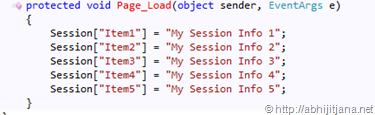
now, if you want to remove all the items from session you can use either Session.RemoveAll() or Session.Clear(). if you check the definition from meta data file you will get below details, where description says the same.
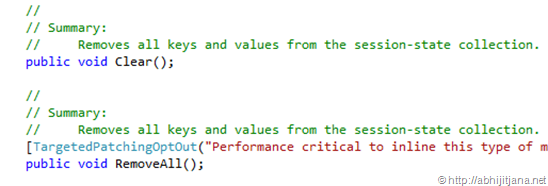
Then what is the difference between these two ? Ok, Session.RemoveAll() Calls Clear() method internally. Yes it is. if you explore this with IL Disassembler ( for Session.Web.dll ) you will find, Session.RemoveAll() is calling Clear() for that the session object instance.
Open IL DASM, browse System.Web.dll from Framework Directory and navigate to System.web > System.Web.SessionState > System.Web.SessionState.HttpSessionState

Now check for Clear() and RemoveAll() method using IL DASM
Session.Clear() :

Session.RemoveAll() : Calling Clear() internally.

If this looks like bit difficult to understand you can use Reflector ( I used Red get Reflector, you can download free trial) to get the more details.
As show in below image, Session.Clear() clearing the Session Container .
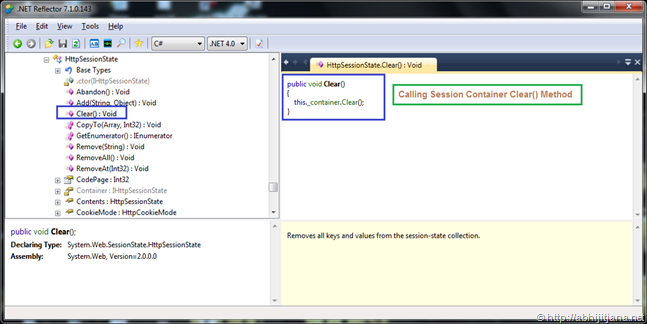
And if you check the details for Session.RemoveAll(), you will find, it is calling Clear() method internally.

Most important thing, you can check the dependency graph for this two method, you will find, Session.RemoveAll() depends on Clear() method.

Session.Clear() is used by RemoveAll() and Session.RemoveAll() depends on Session.Clear() 
Now, what does this two methods do ?
- They removes all keys and values from the session-state collection . which means just remove the session items nothing more than that and session ID Will remain Same
Session ID Before Remove

Now, if you use Session.RemoveAll() or Session.Clear() , it will just clear the items from session collection, but Session Id will remain Same.
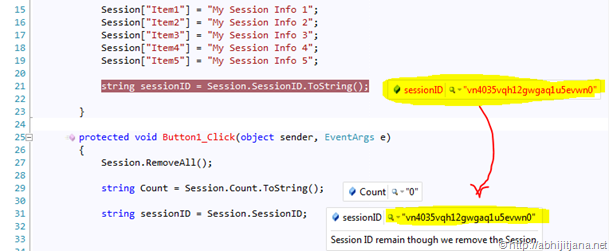
This means, if you add another new element in the same session context, ID will remain same.
Now, you may have once question, why we need two different method where as they are performing the same job. Well as per my understand this is just for providing a generic using of collection by using RemoveAll() method and supporting the all other previous method structure. Clear() is their from beginning from Classic ASP Version, which used to do the clean up the Session Container. So RemoveAll() is just a wrapper which use Clear() internally and provide a collection method to remove all the session information.
Session.Clear() and Session.RemoveAll() never raised Session_End() . Session_End raised by Session.abandon() and if we are not explicitly calling the Abandon(), then Session_End will fire on SessionTimeOut
Hope this give you a clear understanding of internal details of Session.RemoveAll() and Session.Clear().
where as Abandon method destroys all the objects stored in a Session object and releases their resources. Once you call this method, Session_End will raised automatically.
When you abandon a session, the session ID cookie is not removed from the browser of the user. Therefore, as soon as the session has been abandoned, any new requests to the same application will use the same session ID but will have a new session state instance.
Read Complete Details on : How and why session IDs are reused in ASP.NET
If we don’t call Abandon method explicitly, the server destroys these objects when the session times out. Which means, for Session.Clear() and Session.RemoveAll(), just session data get removed, but session still alive, but Session.Abandon() Destroy the all object.
So, if you want to know the main difference with Session.Clear() / Session.RemoveAll() and Session.Abandon()
- Clear removes items immediately from session collection, Abandon destroy the objects.
- Abandon raised Session.End()
- Clear keeps SessionState and resources associated with it where as abandon releases them and GC can collect them any time
 Here is an nice link, which talk about different opinion about this three methods http://bit.ly/kr7diK
And, finally Session.RemoveAt(index) and Session.Remove(string) removed the item from specified index and from given item name of session collection. If either of index or item variable missing, it will throw an exception. This methods are useful when we want to remove some specific item from session Collection.
Well, that’s all. The main objective was to look inside Session.Clear(), Session.RemoveAll() and Session.Abandon(). Hope this gave you a good understanding.
Cheers !
Abhijit
http://twitter.com/#!/AbhijitJana/status/76756735066505218

 Abhijit's Blog
Thanks for the post, nice deep info about session methods. Your efforts really praisable. Thanks sir
LikeLike
Nice explanation Man!! Very easy to understand and also gives the Clear picture of Session.
Thanks for sharing
LikeLike
Thanks Brij !!
LikeLike
really nice post and clears a lot of doubts 🙂
LikeLike
Cheers Abhik !!
LikeLike
Very helpful article Abhijit! Developers will really love to see such neatly explained articles. Keep rocking!!
LikeLike
Thanks Very much Krishna !!
LikeLike
Thanks, your article very helpful, i can finally found the source of problem in my application.
LikeLike
Great !!!
LikeLike
Thanks for sharing!!! Nice Article.
LikeLike
Thanks Deepak !!
LikeLike
Thank You Abhijit for sharing !!!! Great job
LikeLike
Thanks Kirti !!
LikeLike
Thanks For Sharing Information about Session. It helps when someone get problem in Session and I think after reading this thread His/Her Problem get Solved.
LikeLike
Hi Abhijit,
Article is very useful and clears lots of doubt, again you written very smooth article that explain things very easily.
Keep writting such informative articles.
Regards
Sandeep Ramani
LikeLike
Hey… Nice rendition …. Thank you
LikeLike
Hi Abhijit,
Nice article. Simple but informative.
Keep posting.
Regards
Arnab
LikeLike
Great One..
LikeLike
so how to get new session ID for any new requests to the same application after Session Abandon
LikeLike
This is best article so far I have read online. I would like to appreciate you for making it very simple and easy. I have found another nice post related to this post over the internet which also explained very well. Here I am sharing that post url it might also be useful for you.
http://www.mindstick.com/Articles/701259d3-ec8d-4881-8b18-b65923e9f59c/?Session%20in%20ASP.Net
Thanks everyone for your precious post.
LikeLike
Great article. You seems to be expert researcher.
LikeLike
Great post. Clears lots of doubts. Thanks for sharing this info…!!
LikeLike
Really very helpful……thanks for posting…
LikeLike
good example…
LikeLike
thnq for ur xample sir…..its was really helpful 4me…i hve cleard so many doubts..thnq 4ur post…u rockigg sirrrr thnqqqqqq
LikeLike
very nice. my doubt cleared
LikeLike
Nice explanation about Sessions.
LikeLike
Thanks for nice article
LikeLike
Nice post and heavily described. Thanks 🙂
LikeLike
Thanks a lot
LikeLike
hi i am facing one problem in asp.net web page. when i selecting one option my web page will be post back to top. when i am using ie means worked correctly. please tell me some solution.
LikeLike
Very nice explanation 10/10 for this article. i was very confused over RemoveAll(), Clear(), Abandon() method. I googled it whole day but i was not satisfied with other peoples explanation then i got this article link really i feel very thankful for this article.
LikeLike