I wish all my readers, friends and well wishers a very prosperous New Year 2010…
Wish you all lots of joy and happiness.
Regards,
Abhijit
Transforming Engineers to Technology Leaders
I wish all my readers, friends and well wishers a very prosperous New Year 2010…
Wish you all lots of joy and happiness.
Regards,
Abhijit
Sorry to post it little bit later, I was out of station for few weeks and great to see that I have own the first prize in the article competition for my article Exploring IIS 6.0 With ASP.NET . This is fourth times in this year I have received the prizes from codeproject. Thanks to all of you who read my articles and vote for it.
Thanks again to all of you. Hope to publish many more articles for you !
This is quite interesting to know that who is accessing your shared folder in network. We can easily get the information of that user and even you can track what is the activity he is doing in your system. We can achieve this using WMI (Windows Management Instrumentation) and MQL ( Management Query Language ) .
For using WMI you need to add one DLL called System.Management.dll and add the namespace as
using System.Management
Now Read the current Session of your system.
private void Read_Current_Session()
{
try
{
ManagementObjectSearcher searcher =
new ManagementObjectSearcher("root\\CIMV2",
"SELECT * FROM Win32_ServerConnection");
foreach (ManagementObject queryObj in searcher.Get())
{
String RemoteIPAddress = queryObj["ComputerName"].ToString();
String RemoteUserName = queryObj["UserName"].ToString();
String RemoteActiveTime = queryObj["ActiveTime"].ToString();
}
}
catch (ManagementException e)
{
MessageBox.Show("WMI Error: " + e.Message);
}
}
Few Years back I have developed one Open Source Tool (NetSpY) based on WMI and MQL. NetSpy (NetWorkSpy) is an Small Windows based application which will continiouly monitor your shared folder in the network and will generate the complete log of the accessing user activities. This can show you the immidiate popup message that who is accessing right now.
If you are interested please have a look over here,
Net Spy: Your Network Spy That Monitor Your System In Network And Generate Log For Any Changes
This article describes overview of ASP.NET MVC Framework , MVC Control Flow etc.
This article is the Part 1 of the ASP.NET MVC Framework series. In this article I have describes very basic over view of MVC Framework and the control flow of MVC. I will write a few articles in this series which will help all the beginners to move ahead. This article is only about what MVC is.
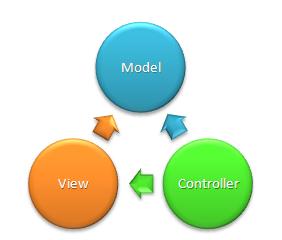
The Model-View-Controller (MVC) design pattern is an architectural design patterns for any standard development that separates the components of an application. This allows application to handle very flexible and extensible and easy to handle. ASP.NET MVC Framework is also one of the standard web development frameworks which separate the components of web development application different components.
ASP.NET MVC Framework having three main components

Model: The model manages the behavior and data of the application domain, responds to requests for information about its state from the view, and responds to instructions to change state (usually from the controller).
View: This represent the presentation layer of the web application. The view manages the display of information based on the data of model that is requested by controller.
Controller: Controller handles the user interaction with the web application. User request comes through controller to model and manipulate the records from it and then render the data using View to UI.
Below diagram showing the overview of these three components


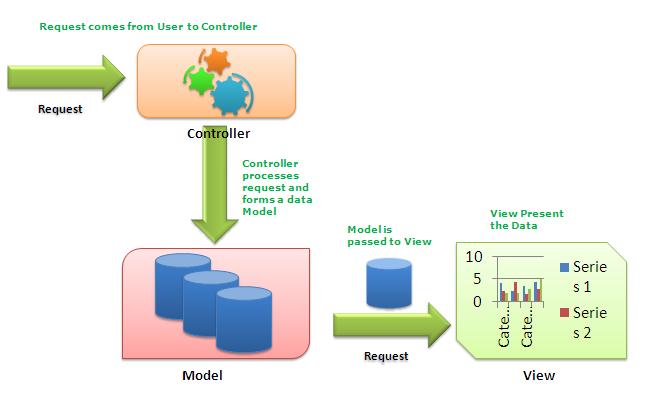
Above picture showing you the actual flow of ASP.NET MVP Framework. Request comes from client to Controller and controller decided which model to used and based on that data rendered into browser.
Now, just have a closer look into to the MVC Flow,
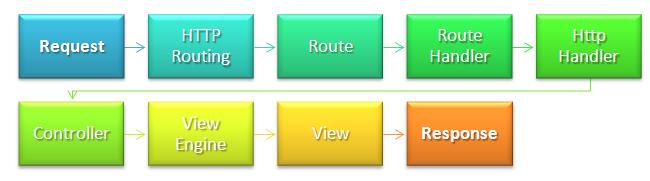
In the next article I will give the explanation of each of every step. You just need to remember these are the basic flow of an MVC Application.
MVC is not a replacement if ASP.NET Web Form based development. This seats on the top of ASP.NET Development. MVC Framework simply divides the overall application architecture into three components.
For More information on the basic of MVC Framework please read :
ASP.NET MVC Overview (C#)
This is the startup article for MVC beginners. Many more to come. Where I will explain details of each of them with sample application. Finally there would be a complete ASP.NET project on MVC Framework. Hope this series will be helpful for all.
As name suggests, bookmarking speedup your code navigation in visual studio. There may be some portion of code where we need to move very frequently. Generally we scroll the page and move to that section, but Visual studio provides great features by which we can move to a particular section very quickly using some shortcut keys. This is called Bookmarking of Code.
Below are the set of Icons which are used to navigate the code using Bookmark.
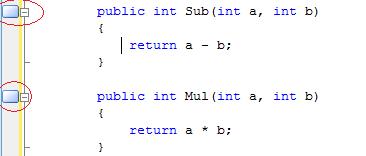
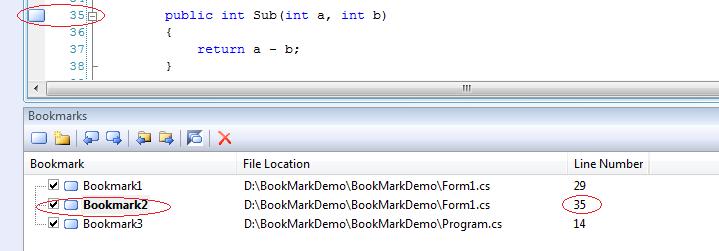
We can place the bookmark by clicking on Bookmark icon or using keys Ctrl + K, Ctrl + K. Below is the sample code where I have putted two bookmarks in different section of code.
Now we can easily navigate among those breakpoint using Ctrl + K, Ctrl + N for Next Bookmark and Ctrl + K , Ctrl + p for Previous mark. We can achieve the same using following toolbar icon.
This is very much easy to use and its give you very fast navigation throughout the code.
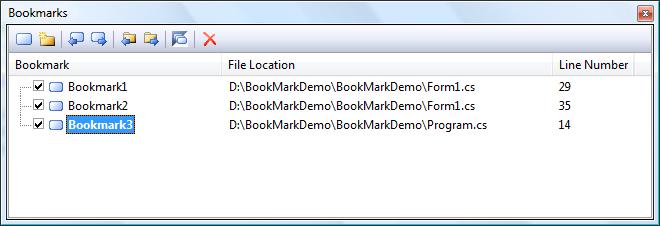
Visual Studio provides you Bookmark window where you can get list of all bookmarked section.
Now, by selecting particular bookmark from the Bookmarks list we can easily move to the particular section.
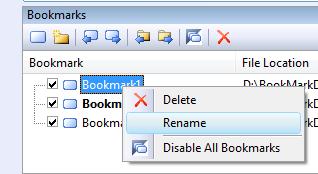
For easy reference we can also rename bookmark so that we can easily identify them. This helps us to easily move to particular code block based on the name given. This is useful when we are having many bookmarks in the bookmark list.
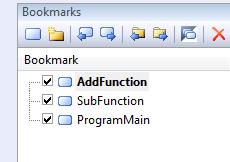
As I have renamed my bookmark list as below
This may not be new to many of us, but it may helpful for some beginners. Using this features we can navingate our code very easily. Please provide your valuable suggestion and feedback.
![]()
Today, I have published another article on IIS 6.0 at codeproject. This article is for the beginners who are trying to learn something on IIS. This article gives a complete coverage of IIS, Hosting sites on IIS, Application pool creation, and IIS Request Processing for ASP.NET Web Application .

I have also mentioned few Tips which are very commonly used in dealing with IIS. Hope this will help the beginners who are struggling with site hosting on IIS and configure it. Please read full article @ Beginner’s Guide : Exploring IIS 6.0 With ASP.NET
Please give your valuable suggestion and feedback to improve this article.
Today, I have published another article on DotNetNuke (DNN). I am working with DNN for last 1 year and having a good experience on DNN. This article is about to create user and roles in DNN. This will really helpful to all the DNN Beginners. If you really interested, Here is my complete article DotNetNuke: User Creation and Role Assignment : For Absolute Beginners!
Please provide your feedback and suggestion for improve this article. Thanks
Now I have got Platinum mebership status from Code Project . This is really an great acheivement. Thanks to all for reading and voting for my articles and for motivating me to write more and more articles.
Here is wishes from CP Members . Thanks to all for best wishes !!
Thanks Again !
Just finished up with publising a new articles on SQL Server and its 4.30 am over here 🙂 . This article is based on the temporary tables in SQL Server 2005. I have explained how to use them, where they stores, when to use etc.
If you are really intereseted, then please read my article complete here, Quick Overview: Temporary Tables in SQL Server 2005
Please give your feedback and valuable suggestion to improve this article.
I have own the first prize in the article competition for my article Remote IIS Debugging. This is Third time in this year I have received the prizes from codeproject. Thanks to all of you who read my articles and vote for it.
Thanks again to all of you.
Lastnight I have published an article on Most Commonly Used Functions in SQL Server 2005/2008. This is quite different article than I used to published.
Objective of this article is to put all mostly used function related in SQL Server 2005/2008 under a sinlge article. There are several function that we are used regularly in SQL Server 2005/2008. This article is will a common place for all those function with proper example.
But, I need your help. This Table of Contents and Article is editable by all CodeProject Silver members and above. What I want you to do is replace the entries in the Table of Contents below add as many as function you aware on SQL Server 2005 or above. This will really help beginners to find out all of them under a single article.
Please Visit here, Most Commonly Used Functions in SQL Server 2005/2008.
Thanks for your support.
Today, I have published another article on fundamental of RAISERROR in SQL Server 2005. Its all about internal of RAISERROR, how to use it, sp_addmessage, use them inside TRY-CATCH etc. If you really interesed, Here is my complete article
Today I have published another article on Web Service Testing- Using SOAP UI. This is very important to test our web service before we moved it to production. Soap UI is one of the best tool for test any SOAP Request and Response. If have described the basick overview of that tool so that any one can start from scratch. If you are really intereseted, then please read my article complete here, Test You Web Service Using Soap UI
Please give your suggestion and feedback .
Today I have published another article on Error Handling in SQL Server 2005. This is all about how we are going to handled errors and exception in T-SQL. I have described basic of @@ERROR and TRY-CATCH Block with proper example. If you are really intereseted, then please read my article here, Overview of Error Handling in SQL Server 2005
Please give your suggestion and feedback .