
I have been asked this question many times by different readers of my blog. They wanted to know about the fundamentals of Web Farms and Web Garden. In this blog post, I am going to explain the what is the exact difference between web farm and web garden, what are the advantages and disadvantages of using them. I have also described how to create web garden in the different version of IIS.
Overview :
Visual Studio is having its integrated ASP.NET engine which is used to run the ASP.NET Web application from Visual Studio. ASP.NET Development Server is responsible for executing all the request and response from the client. Now after the end of development, when you want to host the site on some server to allow other peoples to access, the concept of web servers comes in between. A web server is responsible for responding to all the requests that are coming from clients. Below diagram showing the typical deployment structure of an ASP.NET Web application with a single IIS.
 Clients request for resources and IIS Process the request and send back to clients. If you want to know more details on How IIS Process the request, please read one of my article over “How IIS Process ASP.NET Request ?”.
Web Farm :
This is the case, where you have only one web server and multiple clients requesting for the resources from the same server. But when there are huge numbers of incoming traffic for your web sites, one standalone server is not sufficient to process the request. You may need to use multiple servers to host the application and divide the traffic among them. This is called “Web Farm.” So when you are hosting your single web site on multiple web server over load balancer called “Web Farm.” Below diagram showing the over all representation of Web Farms.

In general web farm architecture, a single application is hosted on multiple IIS Server, and those are connected with the VIP ( Virtual IP ) with Load Balancer. Load Balancer IP’s exposed to external worlds to access. So whenever some request comes to the server from clients, it will first hit the Load Balancer, then based on the traffic on each server LB distributed the request to corresponding web server. These web server may share same DB server or may be they can use replicated server in the back end.
So, In a single statement, When we host a web application over multiple web server to distribute the load among them is called Web Farm. Work from anywhere on any device with a virtual cloud desktop by CloudDesktopOnline.com . For cloud related business software such as SharePoint, Office365, try Apps4Rent .
Web Garden :
Now, let’s have a look, what is Web Garden? Both the terms sound same, but they are different with each other. Before starting with Web Garden, I hope you have a fundamental idea of what is Application Pool and what is Worker Process. In case you are not clear about the concept Application Pool and Worker Process, I would highly recommend reading the article: “How IIS Process ASP.NET Request ?”.
Just to recall, When we are talking about requesting processing with in IIS, Worker Process (w3wp.exe ) takes care all of these. Worker Process runs the ASP.Net application in IIS. All the ASP.Net functionality inside IIS runs under the scope of the worker process. Worker Process is responsible for handling all kind of request, response, session data, cache data. Application Pool is the container of the worker process. Application pools are used to separate sets of IIS worker processes and enable a better security, reliability, and availability for any web application.

Now, by default, every Application pool contains a single worker process. The application which contains the multiple worker processes called “Web Garden”. Below is the typical diagram for a web garden application.
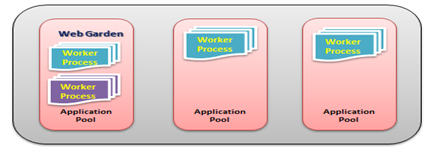
In the above diagram, you can see, on of the application containing the multiple worker processes, which is now a web garden.
So, a Web application hosted on multiple server and access based on the load on servers is called Web Farms and When a single Application pool contains multiple Worker processes is called web garden.
Create Web Garden in IIS 6 and IIS 7
Now, I am going to show how you can change the Number of Worker process In both IIS 6 and IIS 7. For IIS 6, Right Click on Application Pool > Properties > Go to Performance Tab.

In the “Performance Tab” Section you would have one option called “Web Garden” where worker process sets to “1”, you can set the number of worker process that you required.
For IIS 7, Right Click on Application Pool > Go To Advance Settings > In Process Model section, you will have “Maximum Worker Processes” . You can change it more than 1 to make it as web garden.

In the above image you can also check the definition of Web Garden also.
You can find one of my previous article on the basic of same over here
Advantages of Web Farm and Web Garden :
Now, let’s have a look in to the advantages of both the Web farms and Web Garden.
Advantages of Web Farm
- It provides high availability. If any of the server in the farm goes down, the Load balancer can redirect the requests to other servers
- Provides high-performance response for client requests
- Provides Better scalability of the web application and reduce the failure of an application
- Session and another resource can be stored in a centralized location to access all server
Advantages of Web Garden:
- Provides better application availability by sharing request between multiple worker processes
- Web garden use processor affinity where an application can swap out based on preference
- Less consumption of physical space for web garden configuration
How to manage session in Web Farm Mode ?
While using session, requests are distributed among different servers. By default session mode is set to In Proc where session data stored in worker process memory. But, In Web farm way we can share the session among all the server using a single session store location my making it Out proc (State Server or SQL Server Mode). So, if some of the servers go down and request transferred to the other server by the Load balancer session data should be available for that request.
 In the above diagram, you can see we can both the IIS server sharing the same session data which is stored in out of worker process. You can read one of my previous article “Exploring Session in ASP.NET” where I have explained how you can configure session mode for Out Process mode.
How to manage session in Web Garden Mode ?
When we are using Web garden where the request is taking care of different worker process we have to make the session mode as out process session mode as described earlier. For Web Garden, we have configured the out process with on the same server but for the different worker process.

While using Web garden with your application, you need do a couple of configuration settings in web.config in <process Model> section where you need to set certain properties like cpuMask, RequestLimit, webGarden, ClientConnectCheck etc.
Summary :
When we host a web application over multiple web server to distribute the load among them is called Web Farm and when one application is having multiple worker process called Web garden.
In this blog post, I have explained the very basics of what Web Farm is and what Web Garden is. As this blog post contains the necessary information to understand the fundamentals of web farms and web garden concept, I will be posting a separate article with details configuration setting for web garden and web farm. You can read those below articles for more information
Boosting performance using an IIS web garden
How-To Configure Session State in a Windows Web Farm.
Role of Web gardens and web farms in ASP.NET
Hope this will help you.

 Abhijit's Blog
Thank you very much sir you explained very clearly
LikeLike
Hi Abhijita
Thanks for this cool article,
Rgs
Terrence
LikeLike
Hi abhijit,
nice articles..ur rocking…i recently started to follow al ur articles.. thanks for your tremendous knowledge sharing to all readers.
Regards
Ravikiran
(frm EMS proj, brij’s beside seat,noida-60, hope ur do remember me)
LikeLike
Yes Ravi !!
I remembered you !! How are you man !!
Thanks !
Abhiji
LikeLike
Hi Abhijit, thanks for this information, it helped clear my doubts!
Cheers from Brazil!
Louis
LikeLike
I enjoyed this article. Great read, clear and to the point. Keep it up.
LikeLike
Thanks !! 🙂
LikeLike
good knowledge
LikeLike
have a great knowledge
LikeLike
interesting !!! Good effort and clear understanding
LikeLike
Good Description. I hope you can describe the mvc in .net.
LikeLike
Simple and very clear to understand from freshers to expertise …kudos
LikeLike
Good Knowledge for Web farm and web Garden
LikeLike
Great stuff!
LikeLike
Clear like crystal !!! Good Stuff abhijit !!! 🙂
LikeLike
just Excelent…………..
What an article it clears the concepts absolutely.Thanks Abhijit
LikeLike
Hi Abhijit… thanks for this….
LikeLike
Good explanation and easy to understand,
Thank you,
LikeLike
Excellent Article thank you so much
LikeLike
I must Say , Its a great article to understand the basics of Web Garden and Web farm..
LikeLike
Please add one more point under Web Farm as server requirement.
Both the servers should be clone of each other i.e . They should be of smae OS / patch level
For example : You cannot have web farm with 1 server as windows 2003 and 2nd as windows 2008 hosting the same website
LikeLike
Best article that i have ever read, thanks a lot 🙂
LikeLike
Nice Article!!
LikeLike
Well explained. Thank you very much~
LikeLike
simply the best…
LikeLike
Very clear..thanks a lot
LikeLike
Very good and clear article..
Thanx…
LikeLike
Thank you so much Very good article,sir do you have any forum so that if i have any doubts in the future
i can ask you.
LikeLike
Hey Abhijit… your articles are crystal clear.. really good and cool… they style of presentation is simple superb and makes me to read continuously. Became fan of your articles after reading IIS life cycle and next this one. Thank you so much for such a nice effort and hoping to come up with more and more articles. Thanks… Cheers 🙂
LikeLike
superb Article Thx…….For These nice Article…
LikeLike
nice…….
thanks a lot………
LikeLike
Hi Abhijeet…
nice artical :)… but one question … what if one Worker process have some error in web garden?? will that web garden works?
LikeLike
Nice one
Thanks
LikeLike
Nice article.
I would suggest you wrtie another article to elaborate steps to create a sample MVC.NET app with steps to deploy on web farm and web garden.
LikeLike
great Article
LikeLike
nice article
LikeLike
Good Article.
LikeLike
hi,
good article dude…..
LikeLike
I really enjoyed this blog post
LikeLike
It’s really a good article…Has been explained really well.
LikeLike
Siempre acabo aprendiendo aquí.
LikeLike
Thank you very much .
LikeLike
good Article and Well explained..
LikeLike