
Visual Studio IDE gives us a lot of tools to debug our application. Sometimes debugging activity takes a very long time to identify the root cause. But VS IDE provides a lot of handy tools which help to debug code in a better way. Debugger features include error listing, adding breakpoints, visualize the program flow, control the flow of execution, data tips, watch variables and many more. Many of them are very common for many developers and many are not. In this article, I have discussed all the important features of VS IDE for debugging like Breakpoint, labeling and saving breakpoints, putting conditions and filter on breakpoints, DataTips, Watch windows, Multithreaded debugging, Thread window, overview of parallel debugging and overview of IntelliTrace Debugging
Category: My Articles
IIS
Beginner’s Guide: How IIS Process ASP.NET Request
Introduction
When request come from client to the server a lot of operation is performed before sending response to the client. This is all about how IIS Process the request. Here I am not going to describe the Page Life Cycle and there events, this article is all about the operation of IIS Level. Before we start with the actual details, let’s start from the beginning so that each and everyone understand it’s details easily. Please provide your valuable feedback and suggestion to improve this article.
What is Web Server ?
When we run our ASP.NET Web Application from visual studio IDE, VS Integrated ASP.NET Engine is responsible for executing all kind of asp.net requests and responses. The process name is “WebDev.WebServer.Exe” which takes care of all request and response of a web application which is running from Visual Studio IDE.
Now, the name “Web Server” comes into picture when we want to host the application on a centralized location and wanted to access from many places. Web server is responsible for handle all the requests that are coming from clients, process them and provide the responses.

What is IIS ?
IIS (Internet Information Services) is one of the most powerful web servers from Microsoft that is used to host your ASP.NET Web application. IIS has its own ASP.NET Process Engine to handle the ASP.NET request. So, when a request comes from client to server, IIS takes that request and process it and send the response back to clients.

Request Processing :
Hope, till now it’s clear to you that what is the Web server and IIS is and what is the use of them. Now let’s have a look how they do things internally. Before we move ahead, you have to know about two main concepts
1. Worker Process
2. Application Pool
Worker Process: Worker Process (w3wp.exe) runs the ASP.Net application in IIS. This process is responsible for managing all the request and response that are coming from the client system. All the ASP.Net functionality runs under the scope of the worker process. When a request comes to the server from a client worker process is responsible for generating the request and response. In a single word, we can say worker process is the heart of ASP.NET Web Application which runs on IIS.
Application Pool: Application pool is the container of the worker process. Application pools are used to separate sets of IIS worker processes that share the same configuration. Application pools enable a better security, reliability, and availability for any web application. The worker process serves as the process boundary that separates each application pool so that when one worker process or application is having an issue or recycles, other applications or worker processes are not affected. This makes sure that a particular web application doesn’t impact other web application as they are configured into different application pools.

Application Pool with multiple worker processes is called “Web Garden.”
Now, I have covered all the basic stuff like the Web server, Application Pool, Worker process. Now let’s have a look how IIS process the request when a new request comes up from a client.
If we look into the IIS 6.0 Architecture, we can divide them into Two Layer
1. Kernel Mode
2. User Mode
Now, Kernel mode is introduced with IIS 6.0, which contains the HTTP.SYS. So whenever a request comes from Client to Server, it will hit HTTP.SYS First.

Now, HTTP.SYS is Responsible for pass the request to the particular Application pool. Now here is one question, How HTTP.SYS does come to know where to send the request? This is not a random pickup. Whenever we create a new Application Pool, the ID of the Application Pool is being generated, and it’s registered with the HTTP.SYS. So whenever HTTP.SYS Received the request from any web application, it checked for the Application Pool and based on the application pool it sends the request.
 So, this was the first steps of IIS Request Processing.
Till now, Client Requested for some information and request came to the Kernel level of IIS means at HTTP.SYS. HTTP.SYS has been identified the name of the application pool where to send. Now, let’s see how this request moves from HTTP.SYS to Application Pool.
In User Level of IIS, we have Web Admin Services (WAS) which takes the request from HTTP.SYS and pass it to the respective application pool.

When Application pool receives the request, it just passes the request to worker process (w3wp.exe). The worker process “w3wp.exe” looks up the URL of the request to load the correct ISAPI extension. ISAPI extensions are the IIS way to handle requests for different resources. Once ASP.NET is installed, it installs its own ISAPI extension (aspnet_isapi.dll) and adds the mapping into IIS.
Note: Sometimes if we install IIS after installing asp.net, we need to register the extension with IIS using an aspnet_regiis command.

When Worker process loads the aspnet_isapi.dll, it starts an HTTPRuntime, which is the entry point of an application. HTTPRuntime is a class which calls the ProcessRequest method to start Processing.

When this method called, a new instance of HTTPContext is created. Which is accessible using HTTPContext.Current Properties. This object remains alive during the life time of object request. Using HttpContext.Current we can access some other objects like Request, Response, Session, etc.

After that HttpRuntime load, an HttpApplication object with the help of HttpApplicationFactory class. Every request should pass through the corresponding HTTPModule to reach to HTTPHandler, this list of a module is configured by the HTTPApplication.
Now, the concept comes called “HTTPPipeline.” It is called a pipeline because it contains a set of HttpModules ( For Both Web.config and Machine.config level) that intercept the request on its way to the HttpHandler. HTTPModules are classes that have access to the incoming request. We can also create our HTTPModule if we need to handle anything during upcoming request and response.

HTTP Handlers are the endpoints in the HTTP pipeline. All request that is passing through the HTTPModule should reach to HTTPHandler. The HTTP Handler generates the output for the requested resource. So, when we were requesting for any aspx web pages, it returns the corresponding HTML output.
All the request now passes from httpModule to respective HTTPHandler then the method and the ASP.NET Page life cycle starts. This ends the IIS Request processing and starts the ASP.NET Page Lifecycle.

Conclusion
When the client request for some information from a web server, request first reaches to HTTP.SYS of IIS. HTTP.SYS then send the request to particular Application Pool. Application Pool then forwards the request to worker process to load the ISAPI Extension which will create an HTTPRuntime Object to Process the request via HTTPModule and HTTP handler. After that, the ASP.NET Page LifeCycle events start.
This was a just overview of IIS Request Processing to let Beginner’s know how the request gets processed in the backend. If you want to learn about details, please check the link for Reference and Further Study section.
Reference and Further Study
A low-level Look at the ASP.NET Architecture
IIS Architecture
Please share your suggestion and feedback.
Filter GridView Records using AJAX Slider Control
Sometimes we need to filter the gridview data based on some range value. On that case we can use AJAX Slider control to provide scrollable Filter functionality with gridview control. Data source for the Gridview can be anything like XML or Database.
 You can read the complete article and Implementation and download the sample application from DotNetFunda.Com
I will also write one article on AJAX MulipleSlider to filter the data based on minimumn and maximum value.
Please share your valuable feedback and suggestion.
ASP.NET 4.0 Features – MetaDescription and MetaKeywords
ASP.NET 4.0, came up with two new properties inside Page Class, those are MetaDescription and MetaKeyWord. This has been introduce because of make web application Search Engine Friendly. Search Engine looks for Meta tag of our web page to get the details of page contents. In ASP.NET 4.0, we can add these two properties with Page class in Code behind or in Page Directives.
If you want to find out the definition of these two properties, Right Click on Page Class and Click on Goto Definition. This will show you the Meta data information of Page Class as shown in below picture

If we set MetaDescription and MetaKeywords either from Code behind or using Page Directive in aspx page, both will be render as “meta” tag in html code.
The main objective of MetaKeywords and MetaDescription proerties to make your web application SEO friendly. In ASP.NET 2.0, HtmlMeta used to do the same, but in ASP.NET 4.0 make these thing very simple as we can easily add using Page Class.
You can find the Complete Article over, DotNetFunda.com
It has alreday been shared with
You can also follow me @ http://twitter.com/AbhijitJana
My New Article : Exploring Caching : Using Caching Application Enterprise Library 4.1
Enterprise Library caching application Block provides ready to use Caching Framework. This can be used in various application like
* ASP.NET Web application
* Windows Forms
* Console
* Windows Service
* Enterprise Services
* Web service
Implementing caching using Caching Application Block improve the performance of application as well as reduces the development time and cost. This Application blocks provides all kinds of function like adding, removing, managing expiration of cache.
As caching application block is predefined set of code and that are defined in a framework for that we need install Enterprise Library 4.1 First then we need to add some reference in to our application. These are Microsoft.Practices.EnterpriseLibrary.Caching.dll and Microsoft.Practices.EnterpriseLibrary.common.dll.
I have published one complete article on Codeproject.com which describe how to use Enterprise Caching Application Block 4.1 . Here is my complete article
Exploring Caching : Using Caching Application Enterprise Library 4.1
Please provide your valuable suggestion and feedback to improve my articles.
Thank you !
Beginners Guide’s to ASP.NET MVC Framework – Part 1 of n
This article describes overview of ASP.NET MVC Framework , MVC Control Flow etc.
This article is the Part 1 of the ASP.NET MVC Framework series. In this article I have describes very basic over view of MVC Framework and the control flow of MVC. I will write a few articles in this series which will help all the beginners to move ahead. This article is only about what MVC is.
Overview
The Model-View-Controller (MVC) design pattern is an architectural design patterns for any standard development that separates the components of an application. This allows application to handle very flexible and extensible and easy to handle. ASP.NET MVC Framework is also one of the standard web development frameworks which separate the components of web development application different components.
ASP.NET MVC Framework having three main components
- Model
- View
- Controller
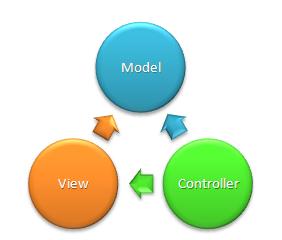
Model: The model manages the behavior and data of the application domain, responds to requests for information about its state from the view, and responds to instructions to change state (usually from the controller).
View: This represent the presentation layer of the web application. The view manages the display of information based on the data of model that is requested by controller.
Controller: Controller handles the user interaction with the web application. User request comes through controller to model and manipulate the records from it and then render the data using View to UI.
Below diagram showing the overview of these three components

Request Flow for ASP.NET MVC Framework
- Request comes from User to Controller
- Controller processes request and forms a data Model
- Model is passed to View
- View transforms Model into appropriate output format
- Response is rendered to Browser
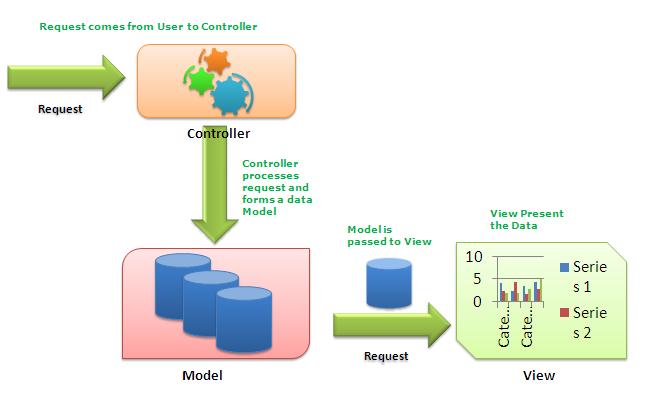
Above picture showing you the actual flow of ASP.NET MVP Framework. Request comes from client to Controller and controller decided which model to used and based on that data rendered into browser.
Now, just have a closer look into to the MVC Flow,
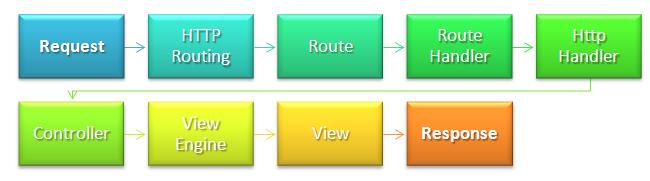
In the next article I will give the explanation of each of every step. You just need to remember these are the basic flow of an MVC Application.
ASP.NET Web Forms and MVC
MVC is not a replacement if ASP.NET Web Form based development. This seats on the top of ASP.NET Development. MVC Framework simply divides the overall application architecture into three components.
For More information on the basic of MVC Framework please read :
ASP.NET MVC Overview (C#)
Summary
This is the startup article for MVC beginners. Many more to come. Where I will explain details of each of them with sample application. Finally there would be a complete ASP.NET project on MVC Framework. Hope this series will be helpful for all.
Using Bookmark in Visual Studio
Introduction
As name suggests, bookmarking speedup your code navigation in visual studio. There may be some portion of code where we need to move very frequently. Generally we scroll the page and move to that section, but Visual studio provides great features by which we can move to a particular section very quickly using some shortcut keys. This is called Bookmarking of Code.
Below are the set of Icons which are used to navigate the code using Bookmark.

How To Use
We can place the bookmark by clicking on Bookmark icon or using keys Ctrl + K, Ctrl + K. Below is the sample code where I have putted two bookmarks in different section of code.
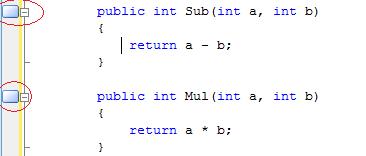
Now we can easily navigate among those breakpoint using Ctrl + K, Ctrl + N for Next Bookmark and Ctrl + K , Ctrl + p for Previous mark. We can achieve the same using following toolbar icon.

This is very much easy to use and its give you very fast navigation throughout the code.
Using Bookmark Window:
Visual Studio provides you Bookmark window where you can get list of all bookmarked section.
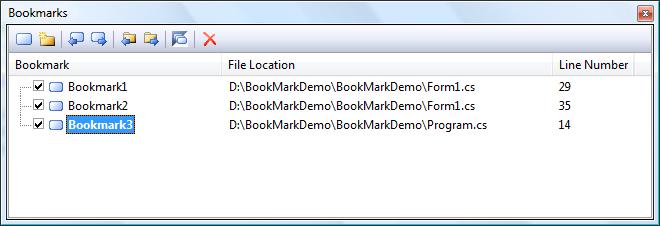
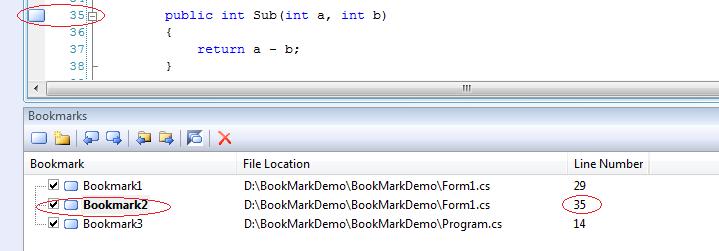
Now, by selecting particular bookmark from the Bookmarks list we can easily move to the particular section.
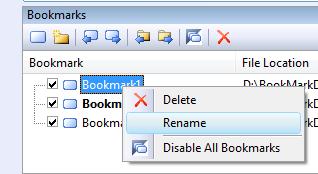
Renaming BookMarks
For easy reference we can also rename bookmark so that we can easily identify them. This helps us to easily move to particular code block based on the name given. This is useful when we are having many bookmarks in the bookmark list.
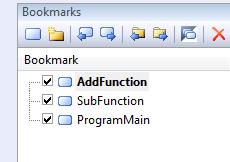
As I have renamed my bookmark list as below
Summary
This may not be new to many of us, but it may helpful for some beginners. Using this features we can navingate our code very easily. Please provide your valuable suggestion and feedback.

My New Article : Beginner’s Guide : Exploring IIS 6.0 With ASP.NET
Today, I have published another article on IIS 6.0 at codeproject. This article is for the beginners who are trying to learn something on IIS. This article gives a complete coverage of IIS, Hosting sites on IIS, Application pool creation, and IIS Request Processing for ASP.NET Web Application .

I have also mentioned few Tips which are very commonly used in dealing with IIS. Hope this will help the beginners who are struggling with site hosting on IIS and configure it. Please read full article @ Beginner’s Guide : Exploring IIS 6.0 With ASP.NET
Please give your valuable suggestion and feedback to improve this article.
My New Article : DotNetNuke : User Creation and Role Assignment : For Absolute Beginners!
Today, I have published another article on DotNetNuke (DNN). I am working with DNN for last 1 year and having a good experience on DNN. This article is about to create user and roles in DNN. This will really helpful to all the DNN Beginners. If you really interested, Here is my complete article DotNetNuke: User Creation and Role Assignment : For Absolute Beginners!
Please provide your feedback and suggestion for improve this article. Thanks
My New Article : Quick Overview: Temporary Tables in SQL Server 2005
Just finished up with publising a new articles on SQL Server and its 4.30 am over here 🙂 . This article is based on the temporary tables in SQL Server 2005. I have explained how to use them, where they stores, when to use etc.

If you are really intereseted, then please read my article complete here, Quick Overview: Temporary Tables in SQL Server 2005
Please give your feedback and valuable suggestion to improve this article.
Most Commonly Used Functions in SQL Server 2005/2008
Lastnight I have published an article on Most Commonly Used Functions in SQL Server 2005/2008. This is quite different article than I used to published.
Objective of this article is to put all mostly used function related in SQL Server 2005/2008 under a sinlge article. There are several function that we are used regularly in SQL Server 2005/2008. This article is will a common place for all those function with proper example.
But, I need your help. This Table of Contents and Article is editable by all CodeProject Silver members and above. What I want you to do is replace the entries in the Table of Contents below add as many as function you aware on SQL Server 2005 or above. This will really help beginners to find out all of them under a single article.
Please Visit here, Most Commonly Used Functions in SQL Server 2005/2008.
Thanks for your support.
My New Article : A Closer Look Inside RAISERROR – SQLServer 2005
Today, I have published another article on fundamental of RAISERROR in SQL Server 2005. Its all about internal of RAISERROR, how to use it, sp_addmessage, use them inside TRY-CATCH etc. If you really interesed, Here is my complete article
My New Article : Test Your ASP.NET WebServices using SOAP UI
Today I have published another article on Web Service Testing- Using SOAP UI. This is very important to test our web service before we moved it to production. Soap UI is one of the best tool for test any SOAP Request and Response. If have described the basick overview of that tool so that any one can start from scratch. If you are really intereseted, then please read my article complete here, Test You Web Service Using Soap UI
Please give your suggestion and feedback .
My New Article : Overview of Error in SQL Server 2005 Handling
Today I have published another article on Error Handling in SQL Server 2005. This is all about how we are going to handled errors and exception in T-SQL. I have described basic of @@ERROR and TRY-CATCH Block with proper example. If you are really intereseted, then please read my article here, Overview of Error Handling in SQL Server 2005
Please give your suggestion and feedback .
 Abhijit's Blog