Blog

Windows Azure Camp – Kolkata –10th April 2011

Microsoft User Group Kolkata is pleased to invite you to the Windows Azure Camp – a 1- day deep dive session designed to help you speed up on developing for Windows Azure. The Windows Azure platform is a flexible cloud-computing platform that lets your customer focus on solving their business problems.

Generic Way to Bind Enum With Different ASP.NET List Controls

In this post I am going to explain how we can bind a Enum with ASP.NET List Controls. These comprise of four different types of control, CheckBoxList, DropDownList, ListBox and RadioButtonList. This is one of the common requirements during development to bind a Enum with List Control and challenge is when we need to bind the both text and value.
Let’s consider we have the blow Enum. Now I am going to bind it with all the above mentioned type List Controls.
image

Well, One of the easiest way that we can implement is by Enum.GetNames(Type enumType)which retrieves the name list of enumberation  and Enum.GetValues(Type enumType), which returns the list of values for each names .

10 ASP.NET Tips and Tricks

Here I am sharing 10 ASP.NET Tips and Tricks most of them related with Grid View Control

How to change GridView column alignments for dynamic data source ?

How to pass multiple values using GridView HyperLinkField ?

Displaying Custom Messages / Images with NULL Value in ASP.NET GridView

Display custom messages or images when there is no records in GridView Data Source

How to Display “Yes” or “No” Instead of Checkbox while binding Boolean value with GridView ?

How to expand specific Tree View Node programmatically in ASP.NET ?

Run ASP.NET Web Application from Command Prompt

 How EnableViewStateMAC Makes ViewState Secure ?

 Disabling button when performing some operation in ASP.NET

 How to remove a persistent cookies before Expiration time ?

To know more Tips and Tricks Follow @dailydotnettips and visit http://dailydotnettips.com

On a side note,  I would like to congratulate couple of my friends, first a key community contributor on WCF, Dhananjay Kumar  for renewing  Microsoft MVP – Connected System again for year 2011. He blogs at  http://debugmode.net/ and his twitter id @debugmode_ .  and second one  Krishna Chaitanya T for Microsoft MVP – Internet Explorer . He is a Web Geek, do lots of research on web technology. He blogs at http://www.novogeek.com/ and his Twitter ID @novogeek . Good job guys !!

My Experience at Microsoft Tech-Ed 2011– 25th March 2011- Bangalore

Microsoft Tech-Ed is the premier technical and networking event for tech enthusiastic which is mainly focused on current and upcoming Microsoft technologies, tools, platforms and services. Tech-Ed India 2011 held at the The Lalit Ashok Hotel , Bangalore From 23rd –25th March 2011. I didn’t think that I will be attending the Tech-Ed 2011 this year as I had already been there at TechReady , Seattle and was busy with my other travel and some of project delivery. But, I finally managed a single day ( thanks to my manager and team mates )  for travel to Bangalore from Hyderabad to attend and meet community geeks over Tech-Ed.

Creating a simple Context Sensitive Help for ASP.NET Controls using jQuery

In this blog post I am going to explain how we can create a simple  Context Sensitive Help for ASP.NET Controls using jQuery. This has been done based on the selection of a controls in a ASP.NET Web Form. On control selection / focus  jQuery Loads a  HTML Content from a remote file, then it’s apply the filter based on the control id and inject the filtered content into a predefined placeholder  with in the DOM Hierarchy.

14 Useful .NET Debugging Tips & Tricks in Visual Studio


List of few useful debugging tips and tricks

1. How to use Runtime Objects in Watch Window during debugging in Visual Studio ?

2. How to use out of scope object with in Conditional Breakpoint ? 

3. Use Conditional Breakpoints with Method Calling in Visual Studio

4. Calling Methods From Watch Window

5. Changing Variables Display Format in Watch Window

6. Get Object Generation using Watch Window

7. Save IntelliTrace Log from IntelliTrace Window

8. Last Session Debugging Value using Data Tips

9. Few Tips on Customizing Debugging Window View in Visual Studio

10. Using DebuggerStepThrough attributes to stepped over code during debugging

11. Hide Methods from debugger Using DebuggerHidden attribute

12. Use “Obsolete” attributes to indicate Obsolete Methods

13. How to suppress compiler warning using #pragma warning directives in Visual Studio ?

14. Customize the Debugging Windows : Change Debugging Window View as per your requirements

To know more Tips and Tricks visit http://dailydotnettips.com and Follow @DailyDotNetTips

Thanks !

AJ

ASP.NET Custom Repeater Control with EmptyTemplate, ShowHeaderWhenEmpty,ShowFooterWhenEmpty,ShowCount Properties

If you have worked with ASP.NET GridView Control you must be aware of GridView.EmptyDataTemplate Property  which Gets or sets the user-defined content for the empty data row when a GriimagedView control  data source has no records. Similarly ShowHeaderWhenEmpty property allows you to show or hide the Header row when there is no records. These are the really good and very frequent required properties. Now, if you are working with the Repeater Control, it doesn’t have any direct features which enables you to set user define content when data source is empty. In this blog post I will discuss how we can create a custom ASP.NET Repeater control with support of EmptyTemplate along with few more important features.

Track Changes and Advance Scroll Mode in Visual Studio 2010

In the recent update of Visual Studio 2010 productivity power tool  there are few new interesting features introduced.   You can download the Productivity tool from http://bit.ly/9nybU6 .  There are certain new features like Quick Find which allows you find and advance find dialog option with in code editor with nice highlighting features, nice enhancement of add reference window. kunal chowdhury has some nice blog post where he talked about  above two new productivity tool features. You can find the post over http://bit.ly/hDa0si and http://bit.ly/grhGAI . In this post I am going to talk about another nice and most interesting features of Power Productivity Tool which “Enhanced Scroll Mode”.  

15 Tips from Daily .NET Tips

Daily .NET Tips is aiming to sharing useful coding tips and tricks for .NET Developers. This site completely design for sharing Tips and Tricks, useful Code Snippet which anyone use in daily development work and targeted anything related with .NET. Here I am sharing few frequently required tips which are already published over there.

  1. How to count number of active session for State Server Session Mode ?
  2. How to use Runtime Objects in Watch Window during debugging in Visual Studio ?
  3. How to calculate Session data size for SQL Server session mode?
  4. Know when your application pools recycling in IIS 7.5 – Log an entry in Event Viewer while recycling
  5. Workaround For Non Serializable Types
  6. How EnableViewStateMAC Makes ViewState Secure ?
  7. Different approaches to Casting
  8. How to Display “Yes” or “No” Instead of Checkbox while binding Boolean value with GridView ?
  9. Changing Variables Display Format in Watch Window
  10. Getting Added And Deleted Items In A List Using LINQ
  11. How to setup multiple startup projects in Visual Studio ?
  12. Displaying Custom Messages / Images with NULL Value in ASP.NET GridView
  13. ASP.NET Validation Control with Images Notification
  14. How to expand specific Tree View Node programmatically in ASP.NET ?
  15. Display custom messages or images when there is no records in GridView Data Source

For more tips please visit  http://dailydotnettips.com and follow @DailyDotNetTips at Twitter

Thanks !

Run ASP.NET Web Application from Command Prompt

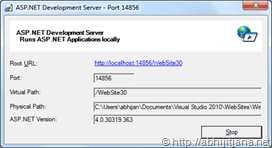
Visual Studio has its own integrated ASP.NET Runtime engine, which helps to run any ASP.NET web application with in Visual Studio.  While running application from Visual Studio, you must have seen a popup notification in System Tray (As shown in below image) , which is notification of ASP.NET Development Server.

image

This ASP.NET Development Server is nothing but a executable file (WebDev.WebServer) which used by Visual Studio to execute you web application when it’s running in the context of Visual Studio.  You can find the executable file at <\Program Files (x86)\Common Files\microsoft shared\DevServer\10.0> . This folder contain two different executable

  • WebDev.WebServer20.EXE
  • WebDev.WebServer40.EXE

WebDev.WebServer20 is targeted to CLR 2.0, which means all the ASP.NET Application which are targeted till FW .NET 3.5 will be taking care by WebDev.WebServer20.EXE and WebDev.WebServer40.EXE for ASP.NET 4.0 based application.

Now, let’s see how we can use these executable to run an ASP.NET 4.0 Application with out using Visual Studio. Surprised smile

Download PPT – “ASP.NET Request Processing Internals” – Microsoft User Group Hyderabad Community Meet – 26 Feb 2011

Yesterday I delivered  1 hour session on “ASP.NET Request Processing Internals”  at Microsoft User Group Hyderabad (MUGH).  This was an half day event and organized at Microsoft Campus , Building 3 MPR Halls , Gachibowli, Hyderabad. I delivered the first session Slide1on ASP.NET Request processing Internals where I talked about how request processing happens in IIS level to ASP.NET Application Level.  In this presentation I talked about how ASP.NET Application runs with in VS IDE ,  then moving to IIS, Different Components of IIS like HTTP.SYS, SVCHOST, WWW Publishing Services, WAS along with there roles in ASP.NET Request processing. I have also covered the key concepts like Worker Process, Application Pool, Web farms and web garden. Then I talked about how requests flow from HTTP.Sys, to WWW Services, WAS and How things happens with Worker Process . I have also talked about HTTP Pipeline and ASP.NET Page life cycle was the last one.

Download Presentation

COMMUNITY MEETUP – Microsoft User Group Hyderabad – 26th Feb’11

image

Hyderabad .NET User Group organized monthly UG meet on this Saturday (26th Feb) at 9:30 A.M at Microsoft Campus , Building 3 MPR Halls , Gachibowli, Hyderabad.

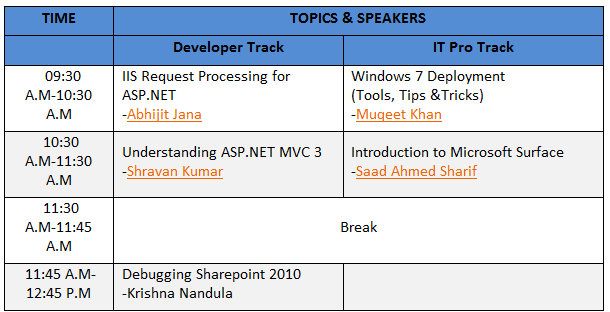
It’s a half day event for both Developer and IT Pro. Track.  I will be speaking on Internals of ASP.NET Request Processing. Below is the complete agenda for the event.

image

For more information  MUGH Community Meet

Come and Join ! See you there ! Thumbs up

Thanks

AJ

Download PPT – “Caching Enhancement in ASP.NET 4.0” – Virtual Tech Days – 9th Feb 2011

Today I delivered an 1 hour session on “Caching Enhancement in ASP.NET 4.0”  at Microimagesoft Virtual Tech days 2011. It was the Day 1  of Virtual Tech Days and I presented the 4th session  on Developer Track 1, from 3.00 PM To 4.00 PM IST. Thanks to all of you for attending my session. In this session I have discussed about ASP.NET 4.0 Caching Enhancement . I started with fundamentals of ASP.NET Caching to make sure all the attends are in same page. In Caching Quick Tour section I have talked about why Caching ? What are the different types of caching ? How Caching works ? etc. Then I have discussed about New Object Caching API in .NET 4.0. In this section I have talked about new Memory Cache API, there Implementation using System.Runtime.Caching . I have also shown how we can use same set of API in an Winforms / WPF / Console Application. Followed by, I have explained how we can extend the Object Caching by implementing MemoryCache Class. 

Microsoft Virtual Tech Days – 9th to 11th Feb 2011

The 11th edition of Virtual TechDays – being held on 9th to 11th Feb 2011. I am gladVTD to say that, I will present a session on “Caching enhancements in ASP.NET 4.0” on 9th Feb 2011 from 3 PM to 4PM (IST) . ASP.NET 4 introduced an extensibility on output caching where developers can create their own custom cache provider to store the cache data in out of process. Output-cache providers can use any storage mechanism like database, file system, cloud etc. to persist output cached content. In this session I  will be discussing the enhancement of ASP.NET 4.0 Caching by creating different custom cache provider for different type of output caching.

This is an live meeting event. You can attend it from any where. To register for this event click here . Find all the details agenda from here .

Tune in for a demo filled session.