In today’s fast-paced tech world, generative AI is transforming how we approach software development. Generative AI is signaling a new era of how we build software, by redefining each phase of the software engineering process, this innovative technology offers groundbreaking potential from predictive requirements gathering to AI-driven deployment strategies. This shift towards a generative AI mindset is not just about efficiency; it’s about unlocking new possibilities in the software engineering landscape.
In the dynamic landscape of Industry 5.0, where intelligent manufacturing and automation drive unprecedented growth and innovation, the emergence of the Internet of Robotics Things (IoRT) stands as a revolutionary force. IoRT represents the fusion of cutting-edge technologies, including the Internet of Things (IoT), Artificial Intelligence(AI), Data Analytics, and Robotics, propelling industrial automation to new heights of efficiency and intelligence. As machines, sensors, and robots become seamlessly interconnected in an intelligent ecosystem, the manufacturing industry undergoes a profound transformation, unlocking the true potential of Industry 5.0.
The manufacturing industry has undergone several phases of evolution over the years, including Industry 0.0, which involved manual labor and hand tools. From there, we saw the introduction of mechanization and steam power in Industry 1.0, followed by mass production and assembly lines in Industry 2.0. Industry 3.0 brought computerization and automation, while Industry 4.0 ushered in the era of digital manufacturing and the Industrial Internet of Things (IIoT). Each phase has sought ways to improve efficiency, productivity, and quality through advancements in technology and automation.
Adopting and Re-engineering Business Process’s is one of the critical factors that determine how we can fast-track an organization’s transformation. It is a comprehensive exercise to rethink and adopt new ways to capture business needs, plan and execute with the help of the right tools and technologies. Organizations must now readjust by embracing rapid and strategic transformation and thoughtful execution to achieve critical business goals faster. The overall process of adoption with modern tools and technologies enables streamlining, brings better traceability, improves cross-team collaboration, transparency & visibility across business units, and improves efficiencies in the executions with data-driven decision-making.
DevOps is about the interaction within production management, software development, build and release management, Quality Assurance, and Administration Team. Azure DevOps has everything you need to develop your software product, from envisioning to put it into end users’ hands. The Azure-hosted DevOps services can enable your end-to-end product delivery with excellent traceability across the teams. Azure DevOps allows you to plan your project using agile tools, manage your source code using several code repositories, automate your build and release using a highly scalable build and release pipeline, manage your test plan, and automate your test case execution. All in all, an end-to-end traceability dashboard for Business users, developers, and other project team members.
I am fortunate enough to be surrounded by several great mentors who guided me throughout my career and helped me to grow both professionally and personally. Over the decade, I also got the opportunity to mentor many students and working professionals and shape their jobs and growth. Over the years, many of you reached out to me over email, via my blog, and I helped most of you in all possible ways. I want to take this platform forward, expand the reach, and commit a dedicated time to have 1:1 connect to guide and help you.
Let’s continue with the previous post on 10 Azure services that every .NET Developers, Consultant, and Architects should know and learn it well. Let us quickly recap what we talked about in the previous post before we move forward. Speed and agility are the keys for any organization to succeed. Moving to cloud services is no more an option – It’s compulsory and a smart move. Cloud Services provide lower cost, higher security, a global footprint, and increase productivity with powerful tools and frameworks. If you are working on Microsoft Platform, no matter what role you are performing – Development Engineer, Engineer in Test, Engineering Consultant, or Architect – understanding of fundamentals of cloud computing and usages are keys.
Speed and agility are the keys to any organization to success. Moving to cloud services is no more an option – It’s compulsory and a smart move. Cloud services bring speed and agility by enabling a rapid pace in development, managing services, and deploying the application on a massive scale over a global network. Cloud Services provide lower cost, higher security, a global footprint, and increase productivity with powerful tools and frameworks. Microsoft Azure, the leading cloud platform provider, evolve in magnitude over the past few years and provides a wide range of services for almost every scenario you need for your business.
Azure DevOps has everything you need to build your software product from envisioning to put in into end-users’ hands. The Azure-hosted DevOps services can enable your end to end product delivery with excellent traceability across the teams. Azure DevOps provides you the ability to plan your project using agile tools, manage your source code using several code repositories, automate your build and release using highly scalable build and release pipeline, manage your test plan and automate your test case execution. All in all, an end to end traceability dashboard for Business users, developers, and other project team members.
Digital Transformation is all about reinventing your business model that empower your employees, engage your customers, transform your products and optimizing the operations. Keeping up with the pace of innovation and using emerging technologies to achieve business goals is the principal objective of the Digital Transformation. Digital Transformation requires speed, DevOps enables seamless collaboration among teams that reduce gaps between groups and FastTrack your release to market. This article talks about how you can leverage Azure DevOps to support speed and agility in your software development while in Digital Transformation.
I'm on a mission to empower Software Engineers to become Technology Leaders by cultivating their Thought Leadership Skills.
Speaking
Over the past decade, I have been fortunate to speak at various conferences, seminars, and other events. I have delivered sessions at prestigious Microsoft events like Tech Ready, TechED, Web Camps, Azure Camps, Community Tech Days, Virtual Tech Days, Devdays, developer conferences, etc. I do love engaging with students and presenting in different seminars, especially for students. I have also presented sessions at IIT Delhi, and IIT Bombay on Kinect for Windows SDK organized by Microsoft Research India. Check out all of my speaking engagements here
Session Delivered : Azure Bot Service & DevOps for Azure Bots
It’s a one full day of deep dive sessions on Azure for Developers, Architects and IT Pro’s delivered by the industry experts and Microsoft MVPs to get you started on Azure Cloud Computing topics like Machine Learning, Internet of Things, Service Fabric, Virtual Machines, Mobile Services and App Services. This was an worldwide event, and was organized over more than 270 location across the globe on 21st April 2018.
Session Delivered : Digital Reality Spectrums and Deep Dive into Mixed Reality Development
VIT University – AP organized their first National Tech Fest, V-TAPP 2018, on 4th March 2018. Several sessions on Mixed Reality, data analytics, 3D printing, artificial intelligence, IOT technology was conducted by industry experts for the benefit of the students. I delivered a session on “Digital Reality Spectrums and Deep Dive into Mixed Reality Development.
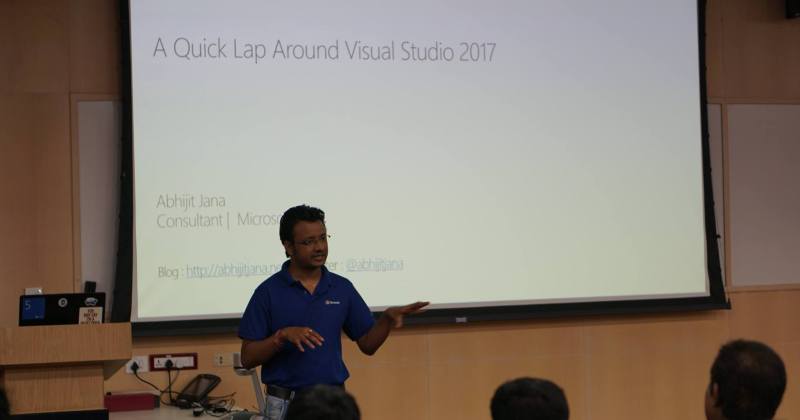
Session Delivered :A Quick Lap Around Visual Studio 2017
We are celebrating Visual Studio’s 20th Anniversary, join us on March 18th to learn more about Visual Studio 2017, .NET Core, ASP.NET Core, Xamarin, Visual Studio Mobile Center, Visual Studio Code, Visual Studio Team Services and DevOps from best in class expert speakers from Community, Microsoft MVPS and Microsoft.
A single tip can improve the productivity of work while coding. Daily .NET Tips is aiming to share useful coding tips and tricks for .net developers. The primary goal of this site is to provide quality tips, tricks, sharing new features, .net How to’s, .net gotchas, .net FAQ and the useful code snippet that may help you in daily development work. This site is targeted for all beginner to advanced level of .net developers. You will find tips and posts from the beginners level to higher level. However, there is no categorization provided in the tips difficulties level. Finally, it is up to you, how you are applying it into your day to day job based on your level of expertise. If you are preparing for any .net interview, this site material may tremendous help to you. What else, visit Daily .NET Tips, and improve your development productivity.
Here is the list of my recent blog posts. To check out my all blog posts, from the main menu, you can navigate to the Blogs option. The articles section listed all of my published articles.
In the rapidly evolving world of technology, the journey from a software engineer to a tech leader is both challenging and rewarding. It’s a path marked by continuous learning, strategic thinking, and a shift from individual contribution to empowering teams.…
As we welcome 2024, I want to take a moment to express my deepest gratitude to you, my dedicated blog readers and followers. Your support and engagement have been the driving force behind this wonderful journey, and I’m excited to…
🎄 Merry Christmas to each of you and your loved ones! 🎅 During this festive season, I hope your days are filled with joy, warmth, and cherished memories. It’s a season of love ❤️, laughter 😄, and appreciating the precious…
I wish you and your family a happy and prosperous New Year 2023. Time for a new beginning, new days, and a new year. I hope this will be an exceptional year for all of us. A new year brings new…
Today, Daily.NET Tips marks its 12th Anniversary! I decided to have a very focused, niche, and single knowledge base of .NET, to empower every developer to become more productive and launch Daily .NET Tips. Today, Daily.NET Tips marks its 12th Anniversary!!! 27th Dec 2010, exactly twelve years ago,…
I wish you and your family a Merry Christmas and a prosperous New Year 2023. This is the season to wish one another joy and love, and it’s all about creating wonderful lifetime memories with friends and families. May your…
Following are the list of books I authored. Kinect for Windows SDK Programming Guide – explain how to develop applications using the Kinect for Windows SDK. HoloLens Blueprints covers developing enterprise solutions using Microsoft HoloLens.
I authored the book titled “HoloLens Blueprints“. Do you want to create stunning applications with HoloLens? Are you a developer who is fascinated with Microsoft HoloLens and its capabilities? If so, this is the book for you. This book introduces and demystifies the HoloLens platform and shows you different ways of interaction with computers (mixed-reality).
you will develop an end-to-end realistic holographic app, ranging from scenario identification to sketching, development, deployment, and, finally, production.
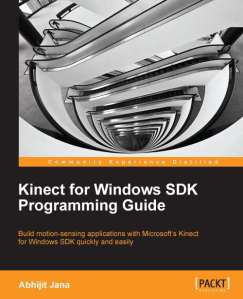
I authored the book titled “Kinect for Windows SDK Programming Guide“. The purpose of this book is to explain how to develop applications using the Kinect for Windows SDK.
If you are a beginner and looking to start developing applications using the Kinect for Windows SDK, and if you want to build motion-sensing, speech-recognizing applications with Kinect, this book is for you.















 Abhijit's Blog